
Rolling Updates Without Downtime: Mastering maxUnavailable and maxSurge
Intermediate · 4 min read
Key takeaways
- Use maxUnavailable and maxSurge to control rolling updates and minimize downtime.
- Monitor the update process to catch and address issues early.
- Balance resource usage and update speed for optimal performance.
The Problem
Imagine you are a DevOps engineer at a rapidly growing e-commerce platform. Your team has just rolled out a critical update to the shopping cart service, but during the deployment, some users experienced downtime, leading to lost sales and frustrated customers. This scenario highlights the importance of performing rolling updates without downtime, ensuring that your application remains available and responsive during deployments.
In this guide, we will explore how to use maxUnavailable and maxSurge in Kubernetes to achieve zero-downtime deployments, ensuring that your application can handle updates smoothly and efficiently.
Core Concepts
Before diving into the mechanics, let's define some key terms:
- Kubernetes (K8s): An open-source container orchestration system for automating application deployment, scaling, and management.
- Deployment: A Kubernetes resource that provides declarative updates for Pods and ReplicaSets.
- Pod: The smallest deployable unit in Kubernetes, which can contain one or more containers.
- ReplicaSet: Ensures that a specified number of Pod replicas are running at any given time.
- Rolling Update: A strategy where old instances are gradually replaced by new ones, minimizing disruption.
- maxUnavailable: The maximum number of Pods that can be unavailable during an update.
- maxSurge: The maximum number of Pods that can be created above the desired number during an update.
How It Works
During a rolling update, Kubernetes uses the maxUnavailable and maxSurge parameters to control the update process. Here's how it works:
- Initial State: The Deployment is running with a certain number of Pods.
- Update Triggered: You apply a new version of the application, triggering the rolling update.
- New Pods Created: Kubernetes creates new Pods based on the updated configuration, up to the
maxSurgelimit. - Old Pods Terminated: As new Pods become ready, old Pods are terminated, but not more than the
maxUnavailablelimit. - Completion: The update is complete when all old Pods are replaced by new ones.
Prerequisites
Before you start, ensure you have the following:
- A Kubernetes cluster (e.g., Minikube, GKE, EKS, AKS).
- kubectl installed and configured to interact with your cluster.
- Basic understanding of Kubernetes concepts such as Deployments, Pods, and ReplicaSets.
Hands-On Walkthrough
Let's walk through a practical example of setting up a rolling update with maxUnavailable and maxSurge.
Step 1: Create the Initial Deployment
apiVersion: apps/v1
kind: Deployment
metadata:
  name: my-app
spec:
  replicas: 5
  selector:
    matchLabels:
      app: my-app
  template:
    metadata:
      labels:
        app: my-app
    spec:
      containers:
      - name: my-app-container
        image: nginx:1.19.0
        ports:
        - containerPort: 80
Apply the Deployment:
kubectl apply -f initial-deployment.yamlStep 2: Update the Deployment
Create a new YAML file for the updated Deployment:
apiVersion: apps/v1
kind: Deployment
metadata:
  name: my-app
spec:
  replicas: 5
  strategy:
    type: RollingUpdate
    rollingUpdate:
      maxUnavailable: 1
      maxSurge: 1
  selector:
    matchLabels:
      app: my-app
  template:
    metadata:
      labels:
        app: my-app
    spec:
      containers:
      - name: my-app-container
        image: nginx:1.21.0
        ports:
        - containerPort: 80
Apply the updated Deployment:
kubectl apply -f updated-deployment.yamlVerifying It Works
To verify that the rolling update is working as expected, you can use the following commands:
kubectl get pods -l app=my-app -o wideThis command will show you the status of all Pods, including the new and old versions. You should see a gradual transition from the old version (nginx:1.19.0) to the new version (nginx:1.21.0).
Common Mistakes
Here are some common mistakes to watch out for:
- Setting
maxUnavailabletoo high: This can lead to more Pods being unavailable than necessary, causing potential downtime. Solution: Start with a conservative value and adjust as needed. - Setting
maxSurgetoo low: This can slow down the update process, as fewer new Pods are created. Solution: Balance between resource usage and update speed. - Not monitoring the update: Always monitor the update process to catch any issues early. Solution: Use tools like kubectl, Prometheus, or Grafana to monitor the update.
Going Further
For production environments, consider the following advanced topics:
- Scaling: Adjust the number of replicas based on load to ensure optimal performance.
- Security: Implement security best practices, such as using secure images, network policies, and role-based access control (RBAC).
- Performance Tuning: Optimize resource requests and limits, and use Horizontal Pod Autoscaler (HPA) for dynamic scaling.
- Alternative Approaches: Explore other update strategies like Blue-Green and Canary deployments, each with their own trade-offs.
Cleanup
To remove the resources created in this tutorial, run the following command:
kubectl delete deployment my-appArchitecture
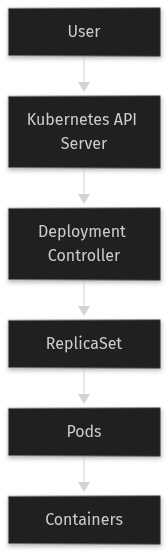
References
This article was written with AI assistance.