
Safely Draining Kubernetes Nodes Before Maintenance
Intermediate · 8 min read
Key takeaways
- Cordon and drain nodes to safely perform maintenance without causing downtime.
- Use the –ignore-daemonsets flag to skip daemonsets during the drain process.
- Always verify node readiness and pod rescheduling after uncordoning the node.
- Consider scaling, security, and performance when draining nodes in a production environment.
The Problem
Imagine you are a DevOps engineer responsible for maintaining a Kubernetes cluster that supports a critical e-commerce application. One day, you receive a notification that a scheduled maintenance window is approaching, and you need to update the underlying infrastructure of your cluster. The last thing you want is for this maintenance to cause downtime or disruptions to your application. This is where the concept of safely draining nodes before maintenance comes into play. By following best practices, you can ensure that your applications remain available and that the maintenance process is as smooth as possible.
Core Concepts
Before diving into the mechanics, let’s cover some fundamental concepts:
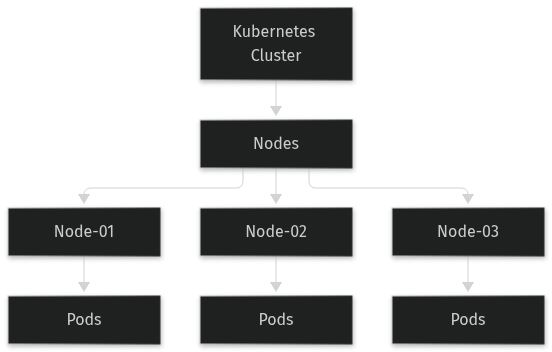
- Kubernetes Node: A node in Kubernetes is a worker machine in the cluster. It can be a physical server or a virtual machine (VM). Each node runs a container runtime, such as Docker, and a kubelet, which is an agent that communicates with the master components.
- Pods: A pod is the smallest deployable unit in Kubernetes. It represents a single instance of a running process in your cluster. Pods can contain one or more containers, storage resources, a unique network IP, and options that govern how the container(s) should run.
- cordon and drain: These are two essential commands in Kubernetes.
cordonmarks a node as unschedulable, meaning no new pods will be scheduled on it.drainevicts all pods from the node, ensuring that they are rescheduled elsewhere in the cluster. - Node Affinity and Taints: Node affinity and taints are ways to control which pods are scheduled on which nodes. Node affinity allows you to specify that a pod should be placed on a particular node, while taints and tolerations allow you to mark nodes as unsuitable for certain pods unless they explicitly tolerate those taints.
How It Works
When you need to perform maintenance on a node, the process of safely draining it involves the following steps:
- Cordon the Node: Mark the node as unschedulable, preventing new pods from being scheduled on it.
- Drain the Node: Evict all existing pods from the node, allowing them to be rescheduled on other nodes in the cluster.
- Perform Maintenance: Once the node is empty, you can proceed with the necessary maintenance tasks.
- Uncordon the Node: After the maintenance is complete, mark the node as schedulable again, allowing new pods to be placed on it.
Prerequisites
Before you start, make sure you have the following:
- A running Kubernetes cluster. For this tutorial, we assume you are using a version of Kubernetes that supports the
kubectl draincommand, which is available in most recent versions. - Access to the cluster with
kubectlconfigured. You should have the necessary permissions to cordon and drain nodes. - A basic understanding of Kubernetes concepts such as nodes, pods, and deployments.
Hands-On Walkthrough
Let’s walk through the process of safely draining a node before performing maintenance. We’ll use a simple example to illustrate the steps.
Step 1: List All Nodes
First, list all the nodes in your cluster to identify the one you want to drain.
kubectl get nodesYou should see output similar to the following:
NAME         STATUS   ROLES    AGE   VERSION
node-01     Ready    <none>   1d    v1.20.0
node-02     Ready    <none>   1d    v1.20.0
node-03     Ready    <none>   1d    v1.20.0
Step 2: Cordon the Node
Next, cordon the node to prevent new pods from being scheduled on it. In this example, we’ll cordon node-01.
kubectl cordon node-01Verify that the node is cordoned by listing the nodes again:
kubectl get nodesYou should see SchedulingDisabled next to the node name:
NAME         STATUS                     ROLES    AGE   VERSION
node-01     Ready,SchedulingDisabled   <none>   1d    v1.20.0
node-02     Ready                      <none>   1d    v1.20.0
node-03     Ready                      <none>   1d    v1.20.0
Step 3: Drain the Node
Now, drain the node to evict all existing pods. Use the --ignore-daemonsets flag to skip daemonsets, which are typically not intended to be moved.
kubectl drain node-01 --ignore-daemonsetsIf there are any pods that cannot be drained, you may need to force the eviction. For example, if a pod has a podAntiAffinity rule, you might need to use the --force and --grace-period flags:
kubectl drain node-01 --ignore-daemonsets --force --grace-period=60Step 4: Perform Maintenance
Once the node is drained, you can proceed with the necessary maintenance tasks. This could include updating the operating system, applying security patches, or replacing hardware.
Step 5: Uncordon the Node
After the maintenance is complete, uncordon the node to make it schedulable again.
kubectl uncordon node-01Verify that the node is now schedulable by listing the nodes again:
kubectl get nodesYou should see that SchedulingDisabled is no longer present:
NAME         STATUS   ROLES    AGE   VERSION
node-01     Ready    <none>   1d    v1.20.0
node-02     Ready    <none>   1d    v1.20.0
node-03     Ready    <none>   1d    v1.20.0
Verifying It Works
To confirm that the node was successfully drained and uncordoned, you can check the status of the pods and the node itself.
Check the Pods
List the pods in the cluster to ensure that they are running on other nodes:
kubectl get pods -o wideYou should see that the pods that were previously on node-01 are now running on node-02 or node-03.
Check the Node Status
List the nodes again to verify that node-01 is ready and schedulable:
kubectl get nodesYou should see that node-01 is back to Ready status without SchedulingDisabled.
Common Mistakes
Here are some common mistakes to avoid when draining nodes:
- Not Ignoring DaemonSets: DaemonSets are designed to run on all (or a subset of) nodes. If you don’t use the
--ignore-daemonsetsflag, the drain command will fail. To avoid this, always use the--ignore-daemonsetsflag unless you specifically need to evict daemonset pods. - Forcing Pod Eviction Without Grace Period: Forcing pod eviction without a grace period can lead to data loss or inconsistent states. Always use the
--grace-periodflag to allow pods to shut down gracefully. A common value is 60 seconds, but you may need to adjust this based on your application’s requirements. - Not Checking for Pending Pods: After draining a node, it’s important to check for any pending pods that might not have been rescheduled. Use
kubectl get pods --all-namespacesto list all pods and look for any in thePendingstate. If you find pending pods, investigate why they are not being rescheduled and take appropriate action. - Not Verifying Node Readiness: After uncordoning the node, always verify that it is in a
Readystate. Usekubectl get nodesto check the node status. If the node is not ready, troubleshoot the issue before proceeding with further operations.
Going Further
Once you have mastered the basics of safely draining nodes, you can explore more advanced topics and production considerations:
- Scaling Considerations: In a large-scale Kubernetes cluster, draining multiple nodes at once can be challenging. Consider using tools like
kubedrainor custom scripts to automate the process. Additionally, ensure that your cluster has enough capacity to handle the load during maintenance, and consider using auto-scaling groups to dynamically add or remove nodes as needed. - Security Best Practices: When draining nodes, ensure that the maintenance process does not introduce security vulnerabilities. For example, if you are updating the operating system, apply the latest security patches and validate that the node meets your organization’s security standards. Use role-based access control (RBAC) to restrict who can cordon and drain nodes, and monitor the cluster for any suspicious activity.
- Performance Tuning: Draining nodes can impact the performance of your applications, especially if the pods are rescheduled to nodes with limited resources. Monitor the cluster’s resource usage and adjust the resource requests and limits for your pods to ensure optimal performance. Consider using tools like Prometheus and Grafana to visualize and alert on resource metrics.
- Alternative Approaches: While
kubectl drainis the standard method for draining nodes, there are alternative approaches you can consider. For example, you can usekubectl taintto add a taint to the node, which will automatically evict all pods that do not tolerate the taint. This approach can be useful in scenarios where you need to quickly remove pods from a node without going through the full drain process. However, be aware that this method may not provide the same level of control and safety askubectl drain.
Cleanup
To clean up after the maintenance, you can simply uncordon the node and let it return to its normal state. If you need to remove any temporary configurations or resources, do so carefully to avoid disrupting the cluster. For example, if you added a taint to the node, you can remove it using the following command:
kubectl taint nodes node-01 key=value-This will remove the taint and allow the node to function as it did before the maintenance.
Architecture
References
This article was written with AI assistance.