API Server Connectivity Issues: When kubectl Hangs
Intermediate · 6 min read
Key takeaways
- Check network connectivity, API server logs, and etcd status to diagnose API server issues.
- Monitor and optimize resource usage on the master node to prevent API server unresponsiveness.
- Secure the API server with TLS, RBAC, and limited access to enhance cluster security.
- Consider scaling the control plane and using managed Kubernetes services for large-scale deployments.
The Problem
“>
Imagine you are a DevOps engineer at a growing e-commerce company. One day, you notice that your Kubernetes cluster is not responding to kubectl commands. You try to run kubectl get pods, but the command hangs indefinitely. This can be a frustrating and critical issue, as it prevents you from managing your cluster and troubleshooting other potential problems. In this guide, we will walk through the steps to diagnose and resolve API server connectivity issues in Kubernetes.
“>
Core Concepts
“>
Before diving into the solution, let’s cover some fundamental concepts:
“>
- “>
- Kubernetes (K8s): An open-source platform for automating deployment, scaling, and management of containerized applications.
- API Server: The central control plane component of Kubernetes. It exposes the Kubernetes API, which allows users and components to interact with the cluster.
- kubectl: A command-line tool used to interact with the Kubernetes API server. It allows you to manage your cluster, including creating, updating, and deleting resources.
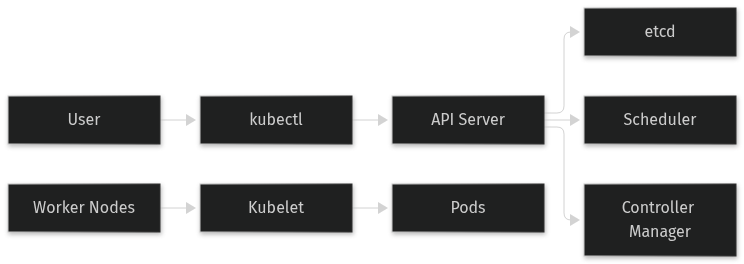
- Control Plane: The set of components that manage the Kubernetes cluster. This includes the API server, etcd (a key-value store), the scheduler, and the controller manager.
- Worker Nodes: The machines that run the containerized applications. They communicate with the control plane to receive and execute tasks.
- etcd: A distributed key-value store that stores the configuration data for the cluster. The API server uses etcd to store and retrieve state information.
“>
“>
“>
“>
“>
“>
“>
How It Works
“>
When you run a kubectl command, the following sequence of events occurs:
“>
- “>
kubectlsends an HTTP request to the API server.- The API server processes the request, interacts with etcd if necessary, and returns the response.
kubectlreceives the response and displays it to the user.
“>
“>
“>
“>
If the API server is not responsive, kubectl will hang because it is waiting for a response that never comes. This can happen due to various reasons, such as network issues, resource exhaustion, or misconfiguration.
">
Prerequisites
">
Before starting, ensure you have the following:
">
- ">
- A running Kubernetes cluster. For this guide, we assume you have a basic understanding of Kubernetes and have a cluster set up.
kubectlinstalled and configured to connect to your cluster.- Access to the nodes in your cluster, either via SSH or a cloud provider's console.
">
">
">
">
Hands-On Walkthrough
">
Let's go through a step-by-step process to diagnose and resolve API server connectivity issues.
">
Step 1: Verify Network Connectivity
">
First, check if the API server is reachable from your local machine.
">
ping <api-server-ip>">
If the ping fails, there might be a network issue. Check your firewall rules, network policies, and any network devices between your machine and the API server.
">
Step 2: Check API Server Logs
">
SSH into the master node and check the API server logs. The logs are usually located at /var/log/kube-apiserver.log.
">
ssh <master-node-ip>">">
Look for any error messages or warnings that might indicate the cause of the issue.
">
Step 3: Check etcd Status
">
Since the API server relies on etcd, check the status of the etcd cluster.
">
etcdctl --endpoints=https://<etcd-endpoint>:2379 --cacert=/etc/kubernetes/pki/etcd/ca.crt --cert=/etc/kubernetes/pki/etcd/server.crt --key=/etc/kubernetes/pki/etcd/server.key endpoint health">
If etcd is unhealthy, it could be the root cause of the API server issues. You may need to restore etcd from a backup or troubleshoot further.
">
Step 4: Check Resource Usage
">
High resource usage (CPU, memory, disk I/O) on the master node can cause the API server to become unresponsive. Check the resource usage on the master node.
">
top">
Look for any processes using excessive resources. If the API server or etcd is using too much CPU or memory, consider scaling up the master node or optimizing the configuration.
">
Step 5: Restart the API Server
">
If the above steps do not resolve the issue, you may need to restart the API server. Be cautious, as this can cause a brief disruption in cluster operations.
">
sudo systemctl restart kube-apiserver">
After restarting, verify that the API server is back online by checking the logs and running a kubectl command.
">
Verifying It Works
">
To confirm that the API server is now responsive, run the following command:
">
kubectl get pods --all-namespaces">
You should see a list of pods across all namespaces. If the command completes successfully, the API server is working correctly.
">
Common Mistakes
">
Here are some common mistakes and how to avoid them:
">
- ">
- Ignoring Network Configuration: Ensure that your network configuration allows traffic to and from the API server. Misconfigured firewalls or network policies can block access.
- Overlooking Resource Limits: High resource usage can cause the API server to become unresponsive. Monitor and optimize resource usage on the master node.
- Not Checking etcd: Since the API server relies on etcd, always check the health of the etcd cluster. An unhealthy etcd can cause API server issues.
- Restarting Without Diagnosing: Restarting the API server without diagnosing the underlying issue can lead to repeated failures. Always identify and fix the root cause before restarting.
">
">
">
">
">
Going Further
">
For production environments, consider the following advanced topics:
">
- ">
- Scaling the Control Plane: In large clusters, you may need to scale the control plane components, including the API server. Use tools like
kubeadmto add more master nodes. - Security Best Practices: Secure the API server by enabling TLS, using role-based access control (RBAC), and limiting access to the API server. Regularly update and patch the control plane components.
- Performance Tuning: Optimize the performance of the API server by tuning parameters such as the number of worker threads, request timeouts, and garbage collection settings. Use tools like
kubectl topto monitor resource usage. - Alternative Approaches: Consider using managed Kubernetes services like GKE, EKS, or AKS, which handle many of the operational complexities for you. However, these services come with their own trade-offs, such as vendor lock-in and limited customization options.
">
">
">
">
">
Cleanup
">
Once you have resolved the API server connectivity issues, no specific cleanup is required. However, if you made any changes to the cluster configuration, ensure they are documented and tested thoroughly.
">
For example, if you added new master nodes, verify that they are functioning correctly and that the cluster is stable.
">
kubectl get nodes">
This command should show all the nodes in your cluster, including the new master nodes.
">">
Conclusion
">
API server connectivity issues can be frustrating, but by following the steps outlined in this guide, you can diagnose and resolve them effectively. Remember to check network connectivity, API server logs, etcd status, and resource usage. By addressing the root cause, you can ensure that your Kubernetes cluster remains responsive and reliable.
">
Architecture
References
This article was written with AI assistance.