
Preventing Common Kubernetes Misconfigurations with Kyverno Policies
Intermediate · 5 min read
Key takeaways
- Kyverno policies help prevent common Kubernetes misconfigurations, enhancing security and stability.
- Validation, mutation, and generation rules in Kyverno can be used to enforce, modify, and create Kubernetes resources.
- Regularly review and update policies to ensure they remain relevant and effective as your cluster evolves.
The Problem
Imagine you are a DevOps engineer at a fast-growing e-commerce company. Your team has been rapidly deploying new services to meet the increasing demand, but you’ve noticed a recurring issue: misconfigured Kubernetes resources. These misconfigurations can lead to security vulnerabilities, performance issues, and even downtime. For example, one of your developers accidentally deployed a service with an exposed port that should have been restricted, leading to a potential security breach. This is where Kyverno policies come in, helping to prevent such misconfigurations and ensuring your Kubernetes cluster remains secure and stable.
Core Concepts
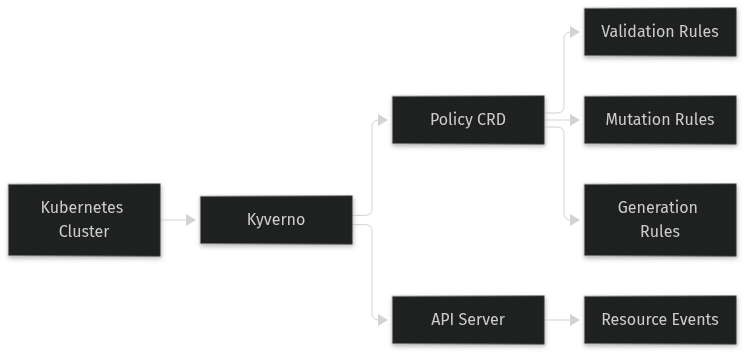
Kyverno is a policy engine designed for Kubernetes. It allows you to define and enforce policies as Kubernetes resources, making it easy to manage and scale. A policy in Kyverno is a set of rules that dictate how Kubernetes resources should be configured. These rules can be used to validate, mutate, or generate Kubernetes resources.
- Validation Rules: These rules check if a resource meets certain criteria before it is allowed to be created or updated. If the criteria are not met, the resource is rejected.
- Mutation Rules: These rules automatically modify a resource to ensure it meets certain criteria. This can be useful for adding default labels, annotations, or other configurations.
- Generation Rules: These rules create new resources based on existing ones. This can be useful for creating related resources, such as a ConfigMap from a Secret.
How It Works
Kyverno policies are defined as Kubernetes Custom Resource Definitions (CRDs). When a policy is applied, Kyverno watches for changes to the specified resources and enforces the rules defined in the policy. For example, a validation rule might check if a Pod has a specific label, and if not, the Pod creation will be rejected. A mutation rule might automatically add a label to a Pod if it’s missing, ensuring all Pods have the required label.
Prerequisites
Before you start, you need to have the following:
- A running Kubernetes cluster (e.g., Minikube, GKE, EKS, AKS)
- kubectl installed and configured to interact with your cluster
- Helm (optional, for installing Kyverno using Helm charts)
Hands-On Walkthrough
Let’s walk through a practical example of using Kyverno to prevent common misconfigurations.
Step 1: Install Kyverno
You can install Kyverno using kubectl or Helm. Here, we’ll use kubectl:
kubectl apply -f https://github.com/kyverno/kyverno/releases/latest/download/kyverno.yamlStep 2: Define a Validation Policy
Create a policy to ensure that all Pods have a specific label. Save the following YAML to a file called `pod-label-policy.yaml`:
apiVersion: kyverno.io/v1
kind: ClusterPolicy
metadata:
  name: require-pod-label
spec:
  validationFailureAction: enforce
  rules:
  - name: check-for-label
    match:
      resources:
        kinds:
        - Pod
    validate:
      message: "Pods must have the 'app' label."">
        pattern:
          metadata:
            labels:
              app: ?*
Apply the policy:
kubectl apply -f pod-label-policy.yamlStep 3: Test the Policy
Create a Pod without the required label:
apiVersion: v1
kind: Pod
metadata:
  name: test-pod
spec:
  containers:
  - name: nginx
    image: nginx:latest
Save this to `test-pod.yaml` and try to apply it:
kubectl apply -f test-pod.yamlYou should see an error message indicating that the Pod does not have the required `app` label.
Step 4: Add the Required Label and Retry
Modify the `test-pod.yaml` to include the `app` label:
apiVersion: v1
kind: Pod
metadata:
  name: test-pod
  labels:
    app: my-app
spec:
  containers:
  - name: nginx
    image: nginx:latest
Apply the modified Pod:
kubectl apply -f test-pod.yamlThis time, the Pod should be created successfully.
Verifying It Works
To verify that the policy is working, you can check the status of the Pod:
kubectl get podsYou should see the `test-pod` running. You can also check the events to see the policy enforcement:
kubectl describe pod test-podLook for the event that indicates the policy was enforced.
Common Mistakes
Here are some common mistakes when using Kyverno policies:
- Overly Broad Policies: Creating policies that are too broad can inadvertently block legitimate configurations. Always test your policies in a non-production environment first.
- Ignoring Validation Failure Actions: The `validationFailureAction` field determines what happens when a policy validation fails. Setting it to `audit` logs the failure but still allows the resource to be created, while `enforce` blocks the resource. Make sure to choose the appropriate action for your use case.
- Not Updating Policies: As your cluster evolves, your policies may need to be updated. Regularly review and update your policies to ensure they remain relevant and effective.
Going Further
Once you have a basic understanding of Kyverno policies, you can explore more advanced topics:
- Scaling Policies: As your cluster grows, you may need to manage a large number of policies. Consider using namespaces to organize your policies and using Kyverno’s policy synchronization features to keep them consistent across multiple clusters.
- Security Enhancements: Use Kyverno to enforce security best practices, such as requiring non-root users, setting resource limits, and restricting the use of privileged containers.
- Performance Tuning: Kyverno policies can impact the performance of your cluster, especially if they are complex or numerous. Monitor the performance of your cluster and adjust your policies as needed to minimize overhead.
- Alternative Approaches: While Kyverno is a powerful tool, there are other policy engines available, such as Open Policy Agent (OPA) and Gatekeeper. Each has its own strengths and trade-offs, so consider evaluating them based on your specific needs.
Cleanup
To remove the Kyverno installation and the policies you created, run the following commands:
kubectl delete -f pod-label-policy.yaml
kubectl delete -f test-pod.yaml
kubectl delete -f https://github.com/kyverno/kyverno/releases/latest/download/kyverno.yaml
Architecture
References
This article was written with AI assistance.