
Cutting Your Kubernetes Bill: Finding Idle and Overprovisioned Resources
Intermediate · 3 min read
Key takeaways
- Identify idle pods by checking for zero network traffic and frequent restarts using kubectl filters.
- Compare resource requests against actual historical usage to eliminate overprovisioned CPU and memory allocations.
- Reduce cluster costs by scaling down replica counts for deployments with low traffic volumes.
- Always monitor performance for 24-48 hours after adjusting resource limits to ensure stability.
The Hidden Cost of Wasted Compute
Kubernetes clusters are powerful, but they are also expensive. A common scenario in DevOps environments is the accumulation of “zombie” resources—pods that are running but doing no work, and deployments with excessive resource requests that sit idle most of the time. This tutorial guides you through identifying these inefficiencies to reduce your cloud bill without impacting performance.
Prerequisites
- A functioning Kubernetes cluster (v1.24+ recommended for stable API behavior).
kubectlinstalled and configured with appropriate permissions.- Access to a namespace or set of namespaces where cost optimization is permitted.
Step 1: Identify Pods with Zero Network Traffic
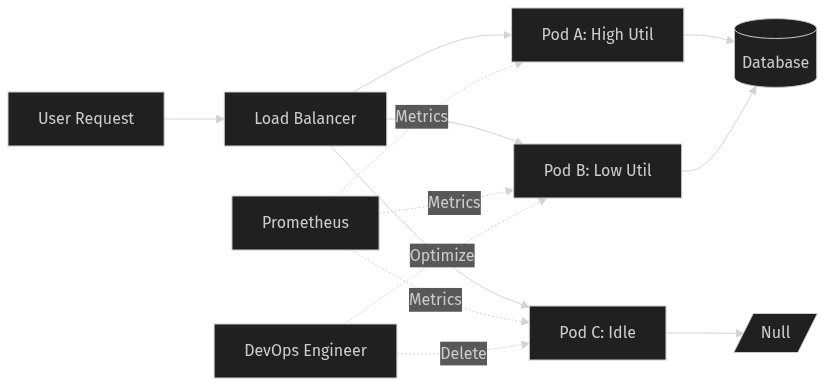
Pods that receive no network traffic are often candidates for termination or scaling down. While this requires network monitoring tools like Prometheus for precise data, we can start by looking at pod restarts and status.
Run the following command to list pods that have restarted frequently or are in a non-running state, which may indicate misconfiguration rather than active service:
kubectl get pods --all-namespaces -o wide | grep -E "(Running|Completed|Error)" | awk '{print $1, $2, $7}'Verification: Check if any “Running” pods have been up for an unusually long time with zero associated ingress logs. If you lack detailed network logs, look for pods in Namespace-A that do not appear in your service mesh dashboard.
Step 2: Analyze Resource Requests vs. Actual Usage
Overprovisioning occurs when you request more CPU/Memory than a pod actually uses. To find these, you need historical metrics. If you have Prometheus/Grafana, query for pods with <20% average utilization over the last 7 days.
Without external tools, you can inspect current resource limits:
kubectl describe deployment <deployment-name> | grep -A 5 "Limits\|Requests"Common Mistake: Assuming that setting high limits protects against spikes. In reality, high requests guarantee billing for that capacity, even if unused. Aim for requests to match steady-state usage.
Step 3: Detect Idle Deployments via Replica Sets
Sometimes entire deployments are unnecessary. Check for deployments with replicas set to high numbers but low activity.
kubectl get deployments --all-namespaces -o custom-columns=NAME:.metadata.name,NAMESPACE:.metadata.namespace,REPLICAS:.spec.replicas,AVAILABLE:.status.availableReplicasVerification: Cross-reference available replicas with actual user traffic. If a deployment has 10 replicas but only handles 10 requests per hour, it is likely overprovisioned.
Step 4: Cleanup and Optimization
Once identified, take action:
- Delete Idle Pods: If a pod is stuck in
CompletedorError, delete it manually or configure cleanup policies. - Reduce Requests: Use
kubectl set resourcesto lower CPU/Memory requests based on observed usage. - Scale Down: Reduce replica counts for low-traffic services.
kubectl set resources deployment/<name> --requests=cpu=100m,memory=128MiCleanup
After optimizing, monitor your cluster for 24-48 hours to ensure no performance degradation occurs. Remove any test namespaces created during this audit.
Architecture
References
This article was drafted with AI assistance and reviewed by the DevOpsEngine editors before publication.