
Disaster Recovery Drills for Kubernetes: Simulating a Cluster Failure
Intermediate · 5 min read
Key takeaways
- Regular disaster recovery drills are essential to ensure your Kubernetes cluster can withstand and recover from failures.
- Use tools like Velero to create and restore backups of your cluster and its resources.
- Always test your backups and include all dependencies to avoid common pitfalls during the DR process.
- Consider advanced topics like scaling, security, and performance tuning to optimize your DR strategy.
The Problem
In today’s fast-paced and highly interconnected world, the reliability and resilience of your applications are more critical than ever. A single failure in your Kubernetes cluster can lead to significant downtime, loss of data, and a damaged reputation. Imagine a scenario where a major cloud provider experiences an outage, causing your entire Kubernetes cluster to go down. This is not just a hypothetical situation; it has happened before, and it can happen again. Conducting regular disaster recovery (DR) drills is essential to ensure that your team is prepared to handle such incidents effectively.
Core Concepts
Before diving into the mechanics of a DR drill, let’s cover some fundamental concepts:
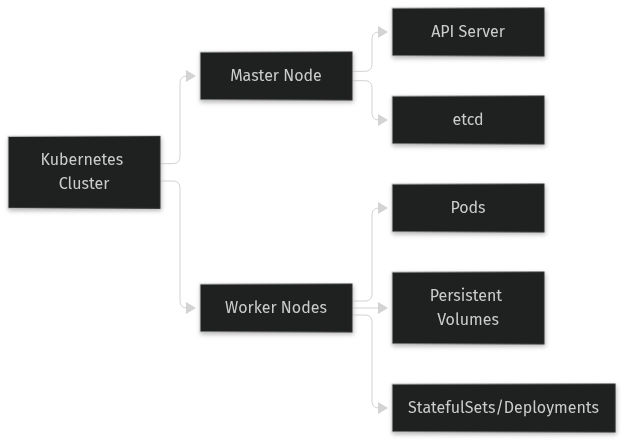
- Kubernetes Cluster: A set of machines (nodes) that run containerized applications managed by Kubernetes. The cluster includes a master node that controls the worker nodes.
- StatefulSets and Deployments: Kubernetes resources that manage the deployment and scaling of stateful and stateless applications, respectively.
- Persistent Volumes (PVs) and Persistent Volume Claims (PVCs): PVs are storage volumes that can be mounted to pods, while PVCs are requests for storage by users. They are used to persist data across pod restarts and failures.
- Backup and Restore: The process of saving and recovering data to ensure that you can restore your applications and data in case of a disaster.
- Multi-Cluster and Multi-Region Deployment: Deploying your applications across multiple clusters or regions to increase fault tolerance and availability.
How It Works
A disaster recovery drill for a Kubernetes cluster involves simulating a cluster failure and then restoring the cluster and its applications. Here’s how it works:
- Simulate the Failure: You can simulate a cluster failure by shutting down the master node or by deleting the cluster entirely. This will mimic a real-world scenario where the cluster becomes unavailable.
- Restore the Cluster: Once the cluster is down, you need to restore it. This involves creating a new cluster, restoring the state from backups, and redeploying the applications.
- Verify the Restoration: After the restoration, you need to verify that the applications are running correctly and that all data is intact.
Prerequisites
Before you start the DR drill, make sure you have the following:
- A Kubernetes cluster up and running (e.g., using Minikube, GKE, EKS, AKS).
- Access to a backup solution (e.g., Velero, Restic, or any other Kubernetes-compatible backup tool).
- A secondary cluster or region to restore the applications (if using multi-cluster or multi-region deployment).
- Basic knowledge of Kubernetes commands and resources.
Hands-On Walkthrough
Let’s walk through a step-by-step DR drill. For this example, we will use Velero for backup and restore operations.
Step 1: Install Velero
First, install Velero on your Kubernetes cluster. You can do this using the following command:
velero install --provider aws --bucket my-bucket --secret-file ./credentials-velero --use-resticThis command installs Velero with AWS as the storage provider and enables Restic for file-level backups.
Step 2: Create a Backup
Next, create a backup of your cluster. This will save the state of your resources and data.
velero backup create my-backup --include-resources=pods,pvcs,deployments,statefulsetsThis command creates a backup named `my-backup` and includes pods, PVCs, deployments, and StatefulSets.
Step 3: Simulate the Failure
To simulate a cluster failure, you can shut down the master node or delete the cluster. For this example, we will delete the cluster.
kubectl config use-context minikube
kubectl delete ns my-namespace
This command deletes the namespace `my-namespace`, which will remove all resources in that namespace.
Step 4: Restore the Cluster
Now, create a new cluster and restore the state from the backup.
kubectl config use-context minikube
velero restore create --from-backup my-backup
This command restores the cluster from the `my-backup` backup.
Verifying It Works
After the restoration, you need to verify that the applications are running correctly and that all data is intact. Use the following commands:
kubectl get all -n my-namespace
kubectl get pvc -n my-namespace
kubectl get pv
These commands will show you the status of all resources, PVCs, and PVs in the `my-namespace` namespace. Ensure that all resources are in the `Running` or `Bound` state.
Common Mistakes
Here are some common mistakes to avoid during a DR drill:
- Not Testing the Backup: Always test your backups before relying on them. A backup that doesn’t work is worse than no backup at all.
- Ignoring Dependencies: Make sure to include all dependencies in your backup. Missing a dependency can cause the restoration to fail.
- Overlooking Security: Ensure that your backup and restore processes are secure. Sensitive data should be encrypted and access should be restricted.
Going Further
Once you have mastered the basics of DR drills, consider the following advanced topics:
- Scaling: Test your DR process with larger clusters and more complex applications to ensure it scales well.
- Security: Implement security best practices, such as encrypting backups, using role-based access control (RBAC), and securing communication channels.
- Performance Tuning: Optimize the performance of your DR process by fine-tuning parameters and using efficient backup and restore tools.
- Alternative Approaches: Explore alternative approaches to DR, such as using multi-cluster or multi-region deployments, and compare their trade-offs.
Cleanup
To clean up the resources created during the DR drill, use the following commands:
kubectl delete ns my-namespace
velero backup delete my-backup
velero restore delete my-restore
These commands will delete the namespace, backup, and restore, cleaning up the environment.
Architecture
References
This article was written with AI assistance.