API Server Connectivity Issues: When kubectl Hangs
Intermediate · 6 min read
Key takeaways
- Understand the role of the Kubernetes API server and how kubectl interacts with it.
- Troubleshoot kubectl hanging issues by checking the kubeconfig file, network connectivity, and API server logs.
- Verify and optimize the API server’s resource limits and security settings for better performance and reliability.
The Problem
“>
Imagine you are a DevOps engineer managing a Kubernetes cluster. One day, you try to run a simple kubectl get pods command, but it hangs indefinitely. This can be a frustrating and time-consuming issue, especially if you need to quickly diagnose and resolve problems in your cluster. Understanding the root causes and how to troubleshoot this issue is crucial for maintaining the reliability and performance of your Kubernetes environment.
“>
Core Concepts
“>
Before diving into the troubleshooting steps, let’s cover some fundamental concepts that will help you understand the problem better.
“>
Kubernetes API Server
“>
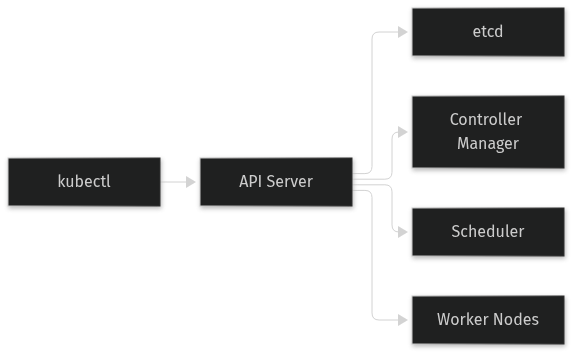
The Kubernetes API server is the central management point for the entire cluster. It exposes the Kubernetes API, which allows users and other components to interact with the cluster. The API server is responsible for processing REST requests, validating them, and updating the state of the cluster.
“>
kubectl
“>
kubectl is the command-line tool used to interact with the Kubernetes API server. It sends HTTP requests to the API server to perform various operations, such as creating, updating, and deleting resources.
“>
Network Communication
“>
For kubectl to function correctly, it needs to establish a network connection to the API server. This connection is typically secured using TLS (Transport Layer Security) and requires authentication and authorization.
“>
How It Works
“>
When you run a kubectl command, the following steps occur:
“>
- “>
kubectlreads the configuration from thekubeconfigfile, which contains the API server’s address, user credentials, and other settings.kubectlestablishes a secure connection to the API server using the provided credentials.kubectlsends an HTTP request to the API server, specifying the action to be performed (e.g., GET, POST, DELETE).- The API server processes the request, performs the necessary actions, and sends a response back to
kubectl. kubectlreceives the response and displays the output to the user.
“>
“>
“>
“>
“><
“>
If any of these steps fail, kubectl may hang or return an error. In this guide, we will focus on scenarios where kubectl hangs due to connectivity issues.
“>
Prerequisites
“>
Before you start troubleshooting, make sure you have the following:
“>
- “>
- A running Kubernetes cluster (local or remote).
- The
kubectlcommand-line tool installed and configured. - Access to the cluster’s
kubeconfigfile. - Basic knowledge of Kubernetes and its components.
“>
“>
“>
“><
“>
Hands-On Walkthrough
“>
Let’s walk through a step-by-step process to troubleshoot and resolve kubectl hanging issues.
“>
Step 1: Verify the kubeconfig File
“>
First, ensure that your kubeconfig file is correctly configured. The kubeconfig file should contain the correct API server URL and user credentials.
“>
cat ~/.kube/config“>
Check the clusters and users sections to ensure they are set up correctly. For example:
“>
apiVersion: v1
kind: Config
current-context: my-cluster
contexts:
- context:
  cluster: my-cluster
  user: my-user
name: my-cluster
clusters:
- cluster:
  certificate-authority-data: DATA+OMITTED
  server: https://my-api-server:6443
name: my-cluster
users:
- name: my-user
  user:
    client-certificate-data: REDACTED
    client-key-data: REDACTED
“>
Step 2: Check Network Connectivity
“>
Verify that your machine can reach the API server. Use tools like ping and telnet to check connectivity.
“>
ping my-api-server
telnet my-api-server 6443
“>
If the ping fails or the telnet connection times out, there may be a network issue. Check your firewall rules, network policies, and DNS settings.
“>
Step 3: Check API Server Logs
“>
If the network connectivity is fine, check the API server logs for any errors or warnings. You can access the logs by running the following command:
“>
kubectl -n kube-system logs <api-server-pod>“>
Look for any messages related to authentication, authorization, or resource limits. These logs can provide valuable insights into what might be causing the issue.
“>
Step 4: Verify Authentication and Authorization
“>
Ensure that your user credentials are valid and that the user has the necessary permissions to perform the requested actions. You can test this by running a simple kubectl command with the --v=8 flag to enable verbose logging:
“>
kubectl --v=8 get pods“>
Examine the output for any authentication or authorization errors. If you see errors, you may need to update your user credentials or adjust the RBAC (Role-Based Access Control) settings.
“>
Step 5: Check Resource Limits
“>
Sometimes, the API server may be under heavy load or may have reached its resource limits. Check the resource usage of the API server pod:
“>
kubectl -n kube-system top pod <api-server-pod>“>
If the API server is using a high amount of CPU or memory, consider scaling the API server or optimizing the cluster’s resource allocation.
“>
Verifying It Works
“>
After completing the troubleshooting steps, verify that kubectl is working correctly by running a few commands:
“>
kubectl get nodes
kubectl get pods -A
kubectl describe pod <pod-name> -n <namespace>
“>
If these commands complete successfully and return the expected output, you have resolved the kubectl hanging issue.
“>
Common Mistakes
“>
Here are some common mistakes and their solutions:
“>
- “>
- Mistake: Incorrect
kubeconfigfile
Ensure that thekubeconfigfile is correctly configured with the right API server URL and user credentials. - Mistake: Network connectivity issues
Check your network settings, firewall rules, and DNS configurations to ensure that your machine can reach the API server. - Mistake: Insufficient permissions
Verify that your user has the necessary permissions to perform the requested actions. Use the--v=8flag to check for authentication and authorization errors. - Mistake: Overloaded API server
Monitor the resource usage of the API server pod and scale it if necessary. Optimize the cluster’s resource allocation to prevent overloading.
“>
“>
“>
“><
“>
Going Further
“>
Once you have resolved the kubectl hanging issue, consider the following production considerations and advanced topics:
“>
Scaling the API Server
“>
To handle increased load, you can scale the API server by adding more replicas or increasing the resource limits. This can be done using a Deployment or StatefulSet in Kubernetes.
“>
Security Best Practices
“>
Implement security best practices, such as using strong encryption, rotating certificates, and enforcing strict RBAC policies. Regularly audit and review your security configurations to ensure they are up-to-date and effective.
“>
Performance Tuning
“>
Optimize the performance of the API server by tuning its configuration parameters, such as the number of worker threads, request timeouts, and garbage collection settings. Use monitoring tools to track the API server’s performance and identify bottlenecks.
“>
Alternative Approaches
“>
Consider using alternative tools and approaches, such as kubectx and kubens, to manage multiple clusters and namespaces. These tools can simplify your workflow and reduce the likelihood of configuration errors.
“>
Cleanup
“>
There is no specific cleanup required for this scenario. However, if you made any changes to the kubeconfig file or the API server configuration, make sure to document and version-control these changes for future reference.
Architecture
References
This article was written with AI assistance.