
TLS Certificate Expiry in the Kubernetes Cluster: Finding and Rotating
Intermediate · 5 min read
Key takeaways
- Identify and check the expiration dates of TLS certificates in Kubernetes Secrets.
- Rotate expiring or expired certificates to maintain secure connections.
- Automate certificate management with tools like cert-manager for reliability.
The Problem
Imagine you are a DevOps engineer responsible for maintaining a large-scale Kubernetes cluster. One day, your monitoring system alerts you that a critical service is experiencing connection issues. Upon investigation, you discover that the TLS certificate used by this service has expired, causing all secure connections to fail. This scenario highlights the importance of managing TLS certificates in a Kubernetes cluster, as expired certificates can lead to downtime, security vulnerabilities, and loss of trust from users.
Core Concepts
Before diving into the mechanics of finding and rotating TLS certificates, it’s essential to understand some fundamental concepts:
- TLS (Transport Layer Security): A cryptographic protocol designed to provide secure communication over a computer network. It ensures privacy, integrity, and authenticity of data exchanged between two parties.
- Certificate: A digital document that binds a public key with an identity. Certificates are issued by a Certificate Authority (CA) and are used to verify the identity of entities in a secure communication.
- Certificate Authority (CA): An entity that issues digital certificates. CAs are trusted third parties that validate the identity of the certificate requester before issuing the certificate.
- Kubernetes Secrets: An object in Kubernetes that stores sensitive information, such as passwords, OAuth tokens, and TLS certificates. Secrets are stored in a way that limits direct exposure of the data.
How It Works
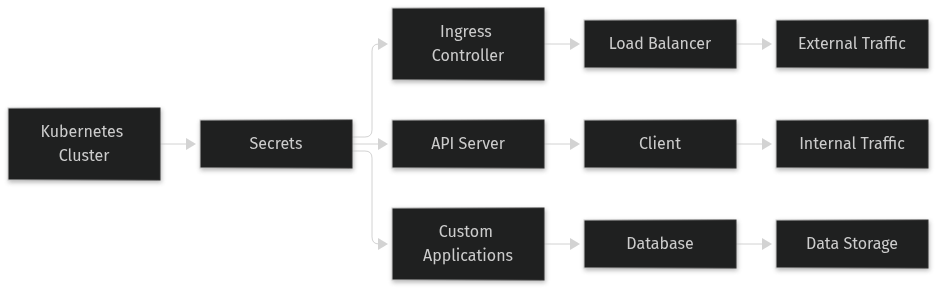
In a Kubernetes cluster, TLS certificates are typically stored as Kubernetes Secrets. These secrets are used by various components, such as Ingress controllers, API servers, and custom applications, to establish secure connections. When a TLS certificate expires, the secure connection fails, and the affected services become inaccessible.
To manage TLS certificates effectively, you need to:
- Identify the certificates in use: Locate all the Kubernetes Secrets that store TLS certificates.
- Check the expiration dates: Determine when each certificate will expire.
- Rotate the certificates: Replace the expiring or expired certificates with new ones.
Prerequisites
Before starting, ensure you have the following:
- A running Kubernetes cluster: You should have a Kubernetes cluster up and running. For this tutorial, we assume you are using a recent version of Kubernetes (e.g., v1.20+).
- kubectl command-line tool: Installed and configured to interact with your Kubernetes cluster.
- A Certificate Authority (CA): A CA to issue new TLS certificates. You can use a self-signed CA for testing purposes or a trusted CA for production environments.
Hands-On Walkthrough
Step 1: Identify the TLS Certificates in Use
First, list all the Kubernetes Secrets in your cluster:
kubectl get secrets --all-namespacesLook for secrets that contain TLS certificates. These secrets usually have names like `tls-secret`, `my-service-tls`, etc. You can inspect the contents of a secret to confirm it contains a TLS certificate:
kubectl get secret <secret-name> -n <namespace> -o yamlStep 2: Check the Expiration Dates
Use the `openssl` command to check the expiration date of a TLS certificate. First, extract the certificate from the secret:
kubectl get secret <secret-name> -n <namespace> -o jsonpath='{.data.tls\.crt}' | base64 --decode > tls.crtThen, check the expiration date:
openssl x509 -in tls.crt -noout -enddateStep 3: Rotate the Certificates
Once you have identified the expiring or expired certificates, you need to obtain new certificates from your CA. For simplicity, let’s assume you have a new certificate and key in files `new-tls.crt` and `new-tls.key`.
Create a new Kubernetes Secret with the new certificate and key:
kubectl create secret tls <new-secret-name> --cert=new-tls.crt --key=new-tls.key -n <namespace>Update the relevant Kubernetes resources (e.g., Ingress, Deployment, Service) to use the new secret. For example, if you are using an Ingress resource, update the `tls` section:
apiVersion: networking.k8s.io/v1
kind: Ingress
metadata:
  name: my-ingress
  namespace: <namespace>
spec:
  tls:
  - hosts:
    - my-service.example.com
    secretName: <new-secret-name>
  rules:
  - host: my-service.example.com
    http:
      paths:
      - path: /
        pathType: Prefix
        backend:
          service:
            name: my-service
            port:
              number: 80
Verifying It Works
To verify that the new certificate is in use, you can check the updated Kubernetes resources and test the secure connection. For example, if you updated an Ingress resource, you can describe the Ingress to see the new secret:
kubectl describe ingress <ingress-name> -n <namespace>Test the secure connection using `curl` or a web browser:
curl -v https://my-service.example.comYou should see the new certificate details in the output, confirming that the rotation was successful.
Common Mistakes
Here are some common mistakes to avoid when rotating TLS certificates in a Kubernetes cluster:
- Not updating all references: Ensure that all Kubernetes resources that reference the old certificate are updated to use the new one. Missing a reference can lead to partial outages.
- Using the wrong certificate chain: Make sure to include the full certificate chain, including any intermediate certificates, when creating the new secret. Missing intermediate certificates can cause validation errors.
- Not testing the new certificate: Always test the new certificate in a non-production environment first to ensure it works as expected. Failing to do so can lead to unexpected issues in production.
Going Further
For production environments, consider the following advanced topics:
- Automated certificate management: Use tools like cert-manager to automate the issuance and renewal of TLS certificates. This reduces the risk of human error and ensures that certificates are always up to date.
- Security best practices: Implement strong key management practices, such as using Hardware Security Modules (HSMs) to store private keys securely. Regularly review and audit your certificate management processes to identify and mitigate security risks.
- Performance tuning: Optimize the performance of your TLS-secured services by configuring cipher suites, enabling session resumption, and using modern TLS versions (e.g., TLS 1.3). These optimizations can improve the speed and efficiency of secure connections.
- Alternative approaches: Consider using Let’s Encrypt for free, automated, and publicly trusted certificates. However, be aware that Let’s Encrypt has rate limits and may not be suitable for all use cases. Alternatively, you can use a private CA for more control and flexibility, but this requires additional infrastructure and management.
Cleanup
To remove the resources created during this tutorial, run the following commands:
kubectl delete secret <new-secret-name> -n <namespace>
kubectl delete ingress <ingress-name> -n <namespace>
Architecture
References
This article was written with AI assistance.