
Alerting on the Right Signals: The RED Method for Kubernetes Services
Intermediate · 5 min read
Key takeaways
- The RED method (Rate, Errors, Duration) is essential for monitoring and alerting on Kubernetes services.
- Implementing the RED method involves configuring Prometheus and Alertmanager with the right metrics and thresholds.
- Common pitfalls include incorrect metric names, imbalanced thresholds, and ignoring historical data.
- Advanced topics include scaling, security, performance tuning, and alternative approaches like the USE method.
The Problem
Imagine you are a DevOps engineer responsible for maintaining a critical e-commerce application running on a Kubernetes cluster. One day, the application starts to experience latency issues, and customers begin to complain about slow response times. You quickly realize that your current monitoring and alerting setup is not providing the right signals to help you diagnose and resolve the issue. This is where the RED (Rate, Errors, Duration) method comes into play. The RED method is a set of key metrics that can help you effectively monitor and alert on the health of your Kubernetes services.
Core Concepts
The RED method is a widely accepted approach for monitoring and alerting on microservices. It focuses on three key metrics:
- Rate (R): The number of requests per second that your service is handling.
- Errors (E): The number of failed requests per second.
- Duration (D): The time it takes to process a request, often measured as the 95th or 99th percentile.
These metrics provide a comprehensive view of the service’s performance and reliability. By focusing on these three metrics, you can quickly identify and respond to issues before they impact your users.
How It Works
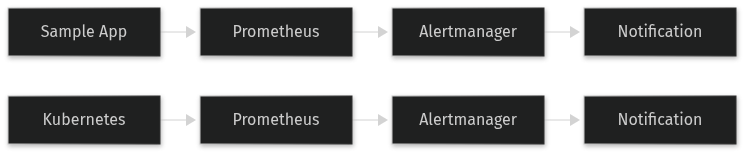
The RED method works by continuously collecting and analyzing the Rate, Errors, and Duration metrics from your Kubernetes services. These metrics are typically collected using a monitoring tool like Prometheus, which can scrape metrics from your applications and store them in a time-series database. Alerts are then configured based on thresholds for each metric. For example, if the error rate exceeds a certain threshold, an alert is triggered, and the appropriate team is notified.
Prerequisites
Before you start implementing the RED method, you need to have the following in place:
- A Kubernetes cluster up and running.
- Prometheus installed and configured to scrape metrics from your Kubernetes services.
- An alerting solution like Alertmanager, which can be integrated with Prometheus.
- Basic familiarity with Kubernetes and YAML for configuration.
Hands-On Walkthrough
Let’s walk through the steps to implement the RED method for a sample Kubernetes service.
Step 1: Deploy a Sample Application
First, we’ll deploy a simple HTTP server as a Kubernetes Deployment and Service. Create a file named `sample-app.yaml` with the following content:
apiVersion: apps/v1
kind: Deployment
metadata:
  name: sample-app
spec:
  replicas: 3
  selector:
    matchLabels:
      app: sample-app
  template:
    metadata:
      labels:
        app: sample-app
    spec:
      containers:
      - name: sample-app
        image: nginx:latest
        ports:
        - containerPort: 80
---apiVersion: v1
kind: Service
metadata:
  name: sample-app
spec:
  selector:
    app: sample-app
  ports:
  - protocol: TCP
    port: 80
    targetPort: 80
Deploy the application using the following command:
kubectl apply -f sample-app.yamlStep 2: Configure Prometheus to Scrape Metrics
Next, we need to configure Prometheus to scrape metrics from our sample application. Assuming you already have Prometheus running, create a file named `prometheus-config.yaml` with the following content:
scrape_configs:
- job_name: 'kubernetes-service-endpoints'
  kubernetes_sd_configs:
  - role: endpoints
  relabel_configs:
  - source_labels: [__meta_kubernetes_service_annotation_prometheus_io_scrape]
    action: keep
    regex: true
  - source_labels: [__meta_kubernetes_service_annotation_prometheus_io_scheme]
    action: replace
    target_label: __scheme__
    regex: (https?)
  - source_labels: [__meta_kubernetes_service_annotation_prometheus_io_path]
    action: replace
    target_label: __metrics_path__
    regex: (.+)
  - source_labels: [__address__, __meta_kubernetes_service_annotation_prometheus_io_port]
    action: replace
    target_label: __address__
    regex: ([^:]+)(?::\d+)?;(.*)
    replacement: ${1}:${2}
Apply the configuration to Prometheus:
kubectl apply -f prometheus-config.yamlStep 3: Set Up Alert Rules
Create a file named `alert-rules.yaml` with the following content to define alert rules for the RED method:
groups:
- name: red-alerts
  rules:
  - alert: HighRequestRate
    expr: rate(http_requests_total[5m]) > 10
    for: 1m
    labels:
      severity: warning
    annotations:
      summary: 'High request rate detected'
  - alert: HighErrorRate
    expr: rate(http_request_errors_total[5m]) > 0.1
    for: 1m
    labels:
      severity: critical
    annotations:
      summary: 'High error rate detected'
  - alert: HighLatency
    expr: histogram_quantile(0.95, sum(rate(http_request_duration_seconds_bucket[5m])) by (le)) > 0.5
    for: 1m
    labels:
      severity: warning
    annotations:
      summary: 'High latency detected'
Apply the alert rules to Prometheus:
kubectl apply -f alert-rules.yamlVerifying It Works
To verify that the RED method is working, you can use the following commands:
# Check the request rate
prometheus> rate(http_requests_total[5m])

# Check the error rate
prometheus> rate(http_request_errors_total[5m])

# Check the latency
prometheus> histogram_quantile(0.95, sum(rate(http_request_duration_seconds_bucket[5m])) by (le))
You should see output indicating the current values for each metric. If the values exceed the thresholds defined in your alert rules, you should receive alerts.
Common Mistakes
Here are some common mistakes to avoid when implementing the RED method:
- Incorrect Metric Names: Ensure that the metric names used in your alert rules match the actual metrics being exposed by your application. Mismatched metric names will result in no alerts being triggered.
- Too Loose or Too Tight Thresholds: Setting thresholds too loosely can result in missing important issues, while setting them too tightly can lead to false positives. It’s important to find a balance based on your specific use case.
- Ignoring Historical Data: Use historical data to set realistic thresholds. Without this, you may set thresholds that are either too high or too low, leading to ineffective alerting.
Going Further
Once you have the basics of the RED method in place, you can consider the following advanced topics:
- Scaling: As your application scales, ensure that your monitoring and alerting infrastructure can handle the increased load. This may involve scaling Prometheus and Alertmanager, and optimizing your metric collection and storage.
- Security: Secure your monitoring and alerting infrastructure by using TLS for communication, and ensuring that only authorized users can access and modify the configuration.
- Performance Tuning: Optimize the performance of your monitoring and alerting system by tuning the retention policies, scraping intervals, and alerting rules. This can help reduce resource usage and improve the overall efficiency of your system.
- Alternative Approaches: Consider other monitoring and alerting methods, such as the USE (Utilization, Saturation, Errors) method, which focuses on system-level metrics. Each method has its own trade-offs, and the best approach depends on your specific use case.
Cleanup
To clean up the resources created in this tutorial, run the following commands:
kubectl delete -f sample-app.yaml
kubectl delete -f prometheus-config.yaml
kubectl delete -f alert-rules.yaml
Architecture
References
This article was written with AI assistance.