
Troubleshooting Missing Audit Trails: Recovering the Identity Behind a Deleted Kubernetes Secret
Advanced · 12 min read
Key takeaways
- Audit policies dictate what is logged; setting sensitive resources to None creates dangerous blind spots.
- The RequestResponse level captures payloads but significantly increases API server CPU and memory overhead.
- Webhook backends require proper buffering to prevent dropping audit events during high API server load.
- Always separate audit log storage from the control plane node to prevent disk exhaustion from crashing the cluster.
The Problem
It is 2:00 AM, and your monitoring system triggers a critical alert: a production database Secret has been deleted. The application pods are failing to start, and the database connection is broken. As the on-call DevOps engineer, your first instinct is to find out who or what deleted the Secret so you can restore it and prevent a recurrence. You SSH into the control plane node and inspect the Kubernetes API server audit logs, expecting to see a clear trail of the deletion event, the requesting user, and the exact resource name.
Instead, you find nothing. The audit log file is either completely empty for that timeframe, or it contains a generic event that lacks the specific resource name and user identity. The previous cluster administrator, attempting to reduce log volume and save disk space, had configured the cluster audit policy to drop delete events on Secrets entirely, or set the logging level to None for sensitive resources. Without these logs, you are flying blind. You cannot prove whether this was a compromised service account, a rogue developer, or an automated controller gone wrong.
This scenario highlights a critical failure in cluster observability. Kubernetes audit logs are the ultimate source of truth for security and compliance, but they are only useful if they are configured correctly. When audit policies are misconfigured, or when the logging backend drops events under load, the resulting blind spots can turn a minor operational hiccup into a major security incident. This guide will walk you through identifying why audit logs go missing, how to reconfigure the audit policy to capture the necessary context, and how to verify that the API server is correctly recording every critical action.
Core Concepts
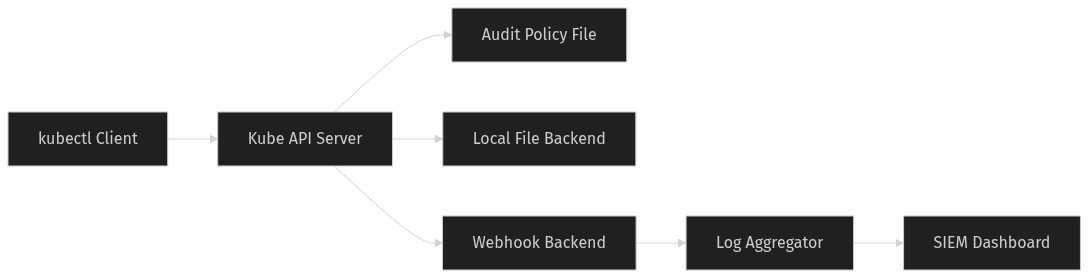
Before fixing the missing logs, we must understand the mechanics of Kubernetes audit logging. At its core, audit logging is a chronological record of security-relevant events that occur within a Kubernetes cluster. Every request made to the Kubernetes API server generates an audit event, which is then processed according to a set of rules.
An Audit Event is a structured JSON document that captures the details of an API request. It includes metadata such as the timestamp, the requesting user or service account, the source IP address, the HTTP verb used, and the specific resource being acted upon. If configured to do so, it can also include the request body and the response body.
The behavior of the audit logging system is governed by an Audit Policy. This is a YAML document that defines a list of rules. When an API request is received, the API server evaluates the request against these rules in order. The first rule that matches the request determines how the event is logged. If no rules match, a default level is applied.
Each rule specifies a Level, which dictates the amount of detail captured in the audit event. There are four primary levels:
- None: Drops the event entirely. No log is generated. This is often used to ignore high-volume, low-value health check requests.
- Metadata: Logs request metadata such as the user, timestamp, resource name, and verb, but omits the request and response bodies.
- Request: Logs metadata and the request body, but omits the response body.
- RequestResponse: Logs metadata, the request body, and the response body. This provides the highest level of detail but consumes the most resources.
Finally, the processed audit events are sent to an Audit Backend. The backend is responsible for persisting the events. Kubernetes supports a local file backend, which writes events to a log file on the control plane node, and a webhook backend, which sends events to an external HTTP endpoint for processing by tools like Fluentd, Logstash, or Falco.
How It Works
Understanding the lifecycle of an API request through the audit middleware is crucial for troubleshooting missing logs. When a client, such as kubectl or a pod service account, makes a request to the Kubernetes API, the request first passes through authentication and authorization. Once authorized, the request enters the admission control chain. After admission control, the request is handed to the audit middleware.
The audit middleware intercepts the request and constructs a preliminary audit event. It then reads the configured Audit Policy file. The middleware iterates through the rules in the policy from top to bottom. For each rule, it checks if the request matches the specified criteria, such as the resource type, the namespace, the verb, or the user group.
When a match is found, the middleware applies the rule’s specified logging level. If the level is None, the event is immediately discarded, and no further processing occurs. If the level is Metadata, Request, or RequestResponse, the middleware enriches the audit event with the appropriate data. For example, if the level is RequestResponse, the middleware captures the entire JSON payload of the request and the eventual response.
Once the event is fully formatted, it is handed to the configured Audit Backend. If using a local file backend, the API server writes the JSON event as a single line to the specified log file. If using a webhook backend, the event is serialized and sent via an HTTP POST request to the configured endpoint. The webhook backend operates asynchronously; it batches events and sends them in bulk to improve performance. However, if the external endpoint is slow or unreachable, the webhook backend relies on an internal buffer. If this buffer fills up, new audit events are dropped to prevent blocking the API server, which is a common cause of missing logs in high-traffic clusters.
Prerequisites
To follow along with this troubleshooting guide, you will need the following:
- A self-managed Kubernetes cluster, version 1.25 or higher. Managed services like EKS or GKE restrict direct access to the API server configuration, making it difficult to modify audit policies and backends directly. We assume the use of kubeadm for this walkthrough.
- Administrative access to the control plane nodes to modify the kube-apiserver static pod manifest.
- The kubectl command-line tool configured with cluster-admin privileges.
- The jq command-line JSON processor installed on your local machine or the control plane node for parsing audit logs.
Hands-On Walkthrough
In our scenario, the audit logs are missing because the previous administrator configured the policy to ignore delete events on Secrets. We need to create a new, precise audit policy that captures these events at the RequestResponse level, apply it to the API server, and verify the behavior.
First, we create the corrected audit policy. We want to log all Secret deletions with full request and response details, while keeping the rest of the cluster at a manageable Metadata level to prevent disk exhaustion.
apiVersion: audit.k8s.io/v1
kind: Policy
rules:
- level: RequestResponse
  resources:
  - group: ""
    resources: ["secrets"]
  verbs: ["delete", "update", "patch"]
- level: Metadata
  resources:
  - group: ""
    resources: ["secrets"]
- level: Metadata
  omitStages:
  - RequestReceived
Let us break down this policy. The first rule matches any request targeting Secrets in the core API group where the verb is delete, update, or patch. It sets the level to RequestResponse, ensuring we capture the exact payload and the identity of the requester. The second rule catches all other interactions with Secrets, such as reads or lists, and logs them at the Metadata level. The final rule acts as a catch-all for all other resources in the cluster, logging them at the Metadata level while omitting the RequestReceived stage to reduce log volume.
Next, we must apply this policy to the kube-apiserver. In a kubeadm cluster, the API server runs as a static pod. We need to edit the pod manifest located at /etc/kubernetes/manifests/kube-apiserver.yaml. We will add the necessary command-line flags to point to our new policy and configure a local file backend.
Locate the command section of the kube-apiserver container and add the following arguments:
- --audit-policy-file=/etc/kubernetes/audit-policy.yaml
- --audit-log-path=/var/log/kubernetes/audit.log
- --audit-log-maxage=30
- --audit-log-maxbackup=10
- --audit-log-maxsize=100
The –audit-policy-file flag tells the API server where to find the rules we just defined. The –audit-log-path flag enables the local file backend and specifies the destination. The maxage, maxbackup, and maxsize flags are critical for production stability; they ensure that old log files are automatically rotated and deleted, preventing the control plane node’s root filesystem from filling up and crashing the cluster.
Save the manifest file. The kubelet will automatically detect the change and restart the kube-apiserver pod. Wait a few moments for the API server to become healthy again.
Now, we simulate the failure scenario to verify our fix. We create a test namespace, a service account, and a Secret. We then bind the service account to a role that allows it to delete Secrets, and use it to delete the test Secret.
kubectl create namespace audit-test
kubectl create secret generic db-creds --from-literal=password=supersecret -n audit-test
kubectl create serviceaccount rogue-user -n audit-test
kubectl create role secret-deleter --verb=delete --resource=secrets -n audit-test
kubectl create rolebinding rogue-binding --role=secret-deleter --serviceaccount=audit-test:rogue-user -n audit-test
kubectl auth can-i delete secrets --as=system:serviceaccount:audit-test:rogue-user -n audit-test
kubectl delete secret db-creds --as=system:serviceaccount:audit-test:rogue-user -n audit-test
Verifying It Works
With the deletion executed, we need to verify that the audit log captured the event with the correct context. We will use the jq tool to parse the JSON lines in the audit log file and extract the relevant details.
Run the following command on the control plane node to find the specific delete event for our Secret:
grep 'db-creds' /var/log/kubernetes/audit.log | jq 'select(.verb == "delete") | {user: .user.username, resource: .objectRef.resource, name: .objectRef.name, verb: .verb, level: .level}'This command searches for the Secret name, filters for the delete verb, and extracts a clean JSON object containing the user identity, resource type, resource name, verb, and the logging level applied.
The expected output should look similar to this:
{
  "user": "system:serviceaccount:audit-test:rogue-user",
  "resource": "secrets",
  "name": "db-creds",
  "verb": "delete",
  "level": "RequestResponse"
}
This output confirms that the audit policy is working correctly. We can clearly see the exact service account that performed the action, the specific resource that was targeted, and the fact that the event was logged at the RequestResponse level. If we were investigating a real incident, this level of detail would allow us to trace the service account back to the specific pod or deployment that initiated the request, using the sourceIPs field also present in the full audit event.
Common Mistakes
When configuring Kubernetes audit logging, several common pitfalls can lead to missing logs or degraded cluster performance.
Mistake 1: Setting the global level to RequestResponse. Some administrators attempt to capture everything by setting the default policy level to RequestResponse. This is a severe performance hazard. Capturing the request and response bodies for every single API call, including high-volume list and watch operations, will drastically increase CPU and memory usage on the API server, and rapidly consume disk space. Always use RequestResponse sparingly, targeting only specific sensitive resources and destructive verbs.
Mistake 2: Ignoring webhook backend buffering. When using a webhook backend to send logs to an external system like Fluentd, the API server relies on an internal buffer. If the external system experiences a temporary outage or processes logs too slowly, the buffer fills up. Once full, the API server drops new audit events to protect its own stability. This results in silent gaps in your audit trail. To avoid this, ensure your external logging backend is highly available and properly scaled, and monitor the API server metrics for webhook buffer drops.
Mistake 3: Storing audit logs on the root filesystem. If the audit log path is set to a directory on the control plane node’s root partition, a sudden spike in API traffic or a misconfigured policy can fill the disk. When the root filesystem reaches 100% capacity, the kubelet and API server will crash, taking down the entire control plane. Always configure the audit log path to use a dedicated, sufficiently large mounted volume, and strictly enforce the log rotation flags.
Going Further
Once you have a baseline audit logging configuration, there are several advanced strategies to enhance security and scalability.
Dynamic Audit Backends: While the local file backend is simple, it does not scale well for large clusters. Production environments should utilize the webhook backend to stream events to a dedicated log aggregation pipeline. Tools like Falco can consume these webhook events in real-time to detect anomalous behavior, such as a service account suddenly attempting to delete multiple Secrets across different namespaces, and trigger automated alerts or block the request via a custom admission controller.
Performance Tuning: If you must use a webhook backend, you can tune the API server’s batching parameters. Flags such as –audit-webhook-batch-max-size and –audit-webhook-batch-buffer-size allow you to control how many events are grouped into a single HTTP request. Increasing the batch size reduces the overhead of HTTP connections but increases the latency before an event is visible in your logging system. Finding the right balance depends on your cluster’s API request rate and your latency requirements for security monitoring.
Integration with SIEM: For enterprise environments, audit logs should be forwarded to a Security Information and Event Management system. By parsing the JSON audit events and mapping the Kubernetes user identities to corporate Active Directory or OIDC identities, security teams can correlate Kubernetes actions with broader network and identity threats, providing a unified view of cluster security.
Cleanup
To restore your cluster to its previous state and remove the test resources, perform the following steps.
First, edit the kube-apiserver static pod manifest at /etc/kubernetes/manifests/kube-apiserver.yaml. Remove the audit-related command-line flags we added earlier. Save the file and allow the kubelet to restart the API server.
Next, delete the test namespace and all resources created during the walkthrough:
kubectl delete namespace audit-testFinally, remove the audit policy file and the audit log file from the control plane node to clean up the filesystem:
rm /etc/kubernetes/audit-policy.yaml
rm /var/log/kubernetes/audit.log
Architecture
References
This article was drafted with AI assistance and reviewed by the DevOpsEngine editors before publication.