
Backing up etcd: Protecting the Cluster’s Brain
Intermediate · 4 min read
Key takeaways
- Regular etcd backups are crucial for disaster recovery and maintaining cluster integrity.
- Use etcdctl to create and store snapshots of the etcd database.
- Automate the backup process using Kubernetes CronJobs for consistency and reliability.
- Test the restore process regularly to ensure the backup is valid and usable.
- Consider security, performance, and alternative tools for production environments.
The Problem
Imagine you are a DevOps engineer responsible for a critical Kubernetes cluster that powers a large e-commerce platform. One day, a catastrophic failure occurs, and the cluster goes down. You realize that the etcd database, which stores all the cluster’s state and configuration, has been corrupted. Without a backup, restoring the cluster to its previous state is nearly impossible, leading to extended downtime and potential data loss. This scenario underscores the importance of backing up etcd, the brain of your Kubernetes cluster.
Core Concepts
Before diving into the mechanics, let’s understand the key components involved:
- Kubernetes (K8s): An open-source system for automating deployment, scaling, and management of containerized applications.
- etcd: A distributed, reliable key-value store used by Kubernetes to store and manage the cluster’s state and configuration data.
- Backup: The process of creating a copy of data to be used in case of data loss or corruption.
etcd is the heart of Kubernetes, storing all the information about the cluster’s state, including nodes, pods, services, and more. If etcd fails, the entire cluster can become unstable or even non-functional. Therefore, regular backups of etcd are crucial for disaster recovery and maintaining the integrity of your cluster.
How It Works
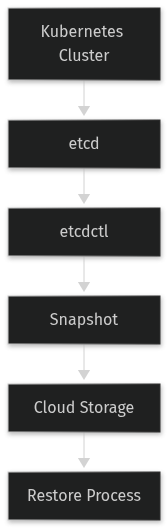
Backing up etcd involves several steps:
- Snapshotting: Creating a point-in-time snapshot of the etcd database.
- Storing: Saving the snapshot to a secure and accessible location.
- Restoring: In case of a failure, using the snapshot to restore the etcd database to a previous state.
etcd provides built-in commands for snapshotting and restoring. The `etcdctl` command-line tool is commonly used for these operations. Additionally, you can automate the backup process using cron jobs or Kubernetes CronJobs to ensure regular backups.
Prerequisites
Before starting, you need the following:
- A running Kubernetes cluster: Ensure your cluster is up and running.
- Access to etcd: You need access to the etcd instances, typically through the master nodes.
- etcdctl: Install the `etcdctl` command-line tool on your local machine or a node with access to etcd.
- Storage for backups: A secure and accessible storage solution, such as a cloud storage bucket or a local file system.
Hands-On Walkthrough
Let’s walk through the process of setting up and performing an etcd backup.
Step 1: Install etcdctl
First, install `etcdctl`. You can download it from the official etcd GitHub repository or use a package manager like `apt` or `brew`.
sudo apt-get update
sudo apt-get install -y etcd-client
Step 2: Configure etcdctl
Configure `etcdctl` to connect to your etcd cluster. You need the endpoints and credentials for authentication.
export ETCDCTL_API=3
export ETCDCTL_CACERT=/etc/kubernetes/pki/etcd/ca.crt
export ETCDCTL_CERT=/etc/kubernetes/pki/etcd/server.crt
export ETCDCTL_KEY=/etc/kubernetes/pki/etcd/server.key
export ETCDCTL_ENDPOINTS=https://10.0.0.1:2379,https://10.0.0.2:2379,https://10.0.0.3:2379
Step 3: Create a Snapshot
Use `etcdctl` to create a snapshot of the etcd database.
etcdctl snapshot save /path/to/snapshot.dbStep 4: Store the Snapshot
Store the snapshot in a secure and accessible location. For example, you can upload it to a cloud storage bucket.
aws s3 cp /path/to/snapshot.db s3://my-bucket/etcd-snapshots/snapshot-$(date +%Y%m%d).dbStep 5: Automate the Backup Process
Create a Kubernetes CronJob to automate the backup process. Here is an example YAML manifest:
apiVersion: batch/v1beta1
kind: CronJob
metadata:
  name: etcd-backup
spec:
  schedule: "0 0 * * *"
  jobTemplate:
    spec:
      template:
        spec:
          containers:
          - name: etcd-backup
            image: quay.io/coreos/etcd:v3.5.0
            command: ["/bin/sh", "-c"]
            args:
            - |\
              export ETCDCTL_API=3\n\
              export ETCDCTL_CACERT=/etc/kubernetes/pki/etcd/ca.crt\n\
              export ETCDCTL_CERT=/etc/kubernetes/pki/etcd/server.crt\n\
              export ETCDCTL_KEY=/etc/kubernetes/pki/etcd/server.key\n\
              export ETCDCTL_ENDPOINTS=https://10.0.0.1:2379,https://10.0.0.2:2379,https://10.0.0.3:2379\n\
              etcdctl snapshot save /tmp/snapshot.db\n\
              aws s3 cp /tmp/snapshot.db s3://my-bucket/etcd-snapshots/snapshot-$(date +\%Y\%m\%d).db
            volumeMounts:
            - name: etcd-certs
              mountPath: /etc/kubernetes/pki/etcd
            - name: aws-credentials
              mountPath: /root/.aws
          volumes:
          - name: etcd-certs
            hostPath:
              path: /etc/kubernetes/pki/etcd
          - name: aws-credentials
            secret:
              secretName: aws-credentials
          restartPolicy: OnFailure
Verifying It Works
To verify that the backup was successful, you can check the contents of the snapshot file and the cloud storage bucket.
ls -l /path/to/snapshot.db
aws s3 ls s3://my-bucket/etcd-snapshots/
You should see the snapshot file in both locations.
Common Mistakes
Here are some common mistakes to avoid:
- Not testing the restore process: Regularly test the restore process to ensure that the backup is valid and can be used in case of a failure.
- Storing backups in insecure locations: Ensure that the backups are stored in a secure and accessible location to prevent unauthorized access and data loss.
- Not automating the backup process: Automate the backup process to ensure regular and consistent backups.
Going Further
For production environments, consider the following advanced topics:
- Scaling: Use multiple etcd instances to ensure high availability and fault tolerance.
- Security: Secure the etcd cluster with TLS and authentication to prevent unauthorized access.
- Performance Tuning: Optimize etcd performance by tuning parameters such as disk I/O, memory, and network settings.
- Alternative Approaches: Consider using third-party tools and services for etcd backup and disaster recovery, such as Velero, which provides additional features and integrations.
Cleanup
To remove the CronJob and any associated resources, use the following command:
kubectl delete cronjob etcd-backupArchitecture
References
This article was written with AI assistance.